The platform
One system, from first inquiry to move-out.
Six modules that don't hand off to each other with a spreadsheet in between. Every one below is live — touch it, don't look at a screenshot.
Pipeline & Sales War Room
Every rep works the leads worth the most, first.
A 10-stage drag-and-drop pipeline with 0–100 lead scoring that shows why — Urgency + Budget + Contact + Source — not a black box. The Daily Mission ranks today's work into Critical, Due Today, and Recommended, with Expected Monthly Revenue and Lifetime Value on every card.
- 30-day census forecast with a probability-weighted move-in timeline
- Revenue intelligence: pipeline ceiling, weighted pipeline, revenue at risk, live close-rate simulator
- Pipeline health scorecard across 5 dimensions with one-click Fix Now
- Lead source ROI — what you pay per lead elsewhere, next to the $0 you pay here
How it actually works
The score breakdown sits on every card — Urgency, Budget, Contact, and Source, adding up in front of the rep. A 78 is auditable, not a gut call, so nobody argues with the priority order.
Automation Engine
The follow-up happens whether your team remembers or not.
10 email and 10 SMS templates, personalized automatically, fired by real behavior: opened-no-reply at 48 hours, a clicked link flags the lead hot, no contact in 72 hours alerts a staffer, a tour no-show gets an empathetic follow-up on its own. A built-in AI writer drafts and improves every message.
- Trigger sequences: lead received → instant follow-up; tour tomorrow → reminder
- Behavior-based hot-lead flagging
- AI writer for drafting and improving any message
- Compliant opt-out handling built in
How it actually works
When a prospect clicks a link, the lead flips to Hot and climbs the Daily Mission the same session. The sequence reacts to what a family actually did — not a fixed day-3 drip that fires whether they're interested or not.
Communications Hub
A dedicated local number for every community, texting inside the CRM.
Each community gets its own phone number auto-provisioned in its local area code. Two-way SMS threads live in the CRM, iMessage-style. Missed calls get texted back automatically. Call forwarding reaches a sales director's cell. Email opens and clicks are tracked.
- Auto-provisioned local number per community
- Two-way SMS threading inside the CRM
- Missed-call text-back, automatically
- Email open + click tracking with opt-out compliance
How it actually works
Every inbound text lands in the same thread the rep already works, tied to the prospect record. Nobody forwards a screenshot from a personal phone, and when a rep is out, the conversation is right there for whoever picks it up.
Resident Bridge
The CRM doesn't go dark the moment a deal closes.
Drag a prospect straight from the pipeline onto an open room on an interactive floor plan to reserve it. Full resident profiles — care details, family contacts, daily logs, photo gallery, documents, billing. Expected move-out tracking feeds the census forecast on its own. A closed loop from first inquiry to move-out.
- Interactive floor plan — reserve a room by dragging a prospect onto it
- Resident profiles: care, contacts, daily logs, photos, documents, billing
- Caregiver quick-log and family photo sharing
- Move-out tracking that updates the census forecast automatically
How it actually works
Set a resident's expected move-out date and the 30-day census forecast updates on its own — the opening shows up on the floor plan and in the pipeline's available-rooms view before the bed is empty. Occupancy planning stops being a separate spreadsheet.
Analytics
Every number on the dashboard is your own real data.
Lead funnel, conversion trends, lead-source performance, communication performance — defensible in a board meeting because none of it is borrowed industry benchmarks. It's what actually happened in your community.
- Lead funnel and conversion-trend reporting
- Lead-source performance and communication performance
- No unverified industry benchmarks — ever
- Exportable, board-ready
How it actually works
Conversion is computed from your own stage history — click any funnel step to see the exact prospects behind the number. When an owner asks where a figure came from, the answer is one click, not a rebuilt spreadsheet.
Team & Security
Access built around how senior living orgs actually operate.
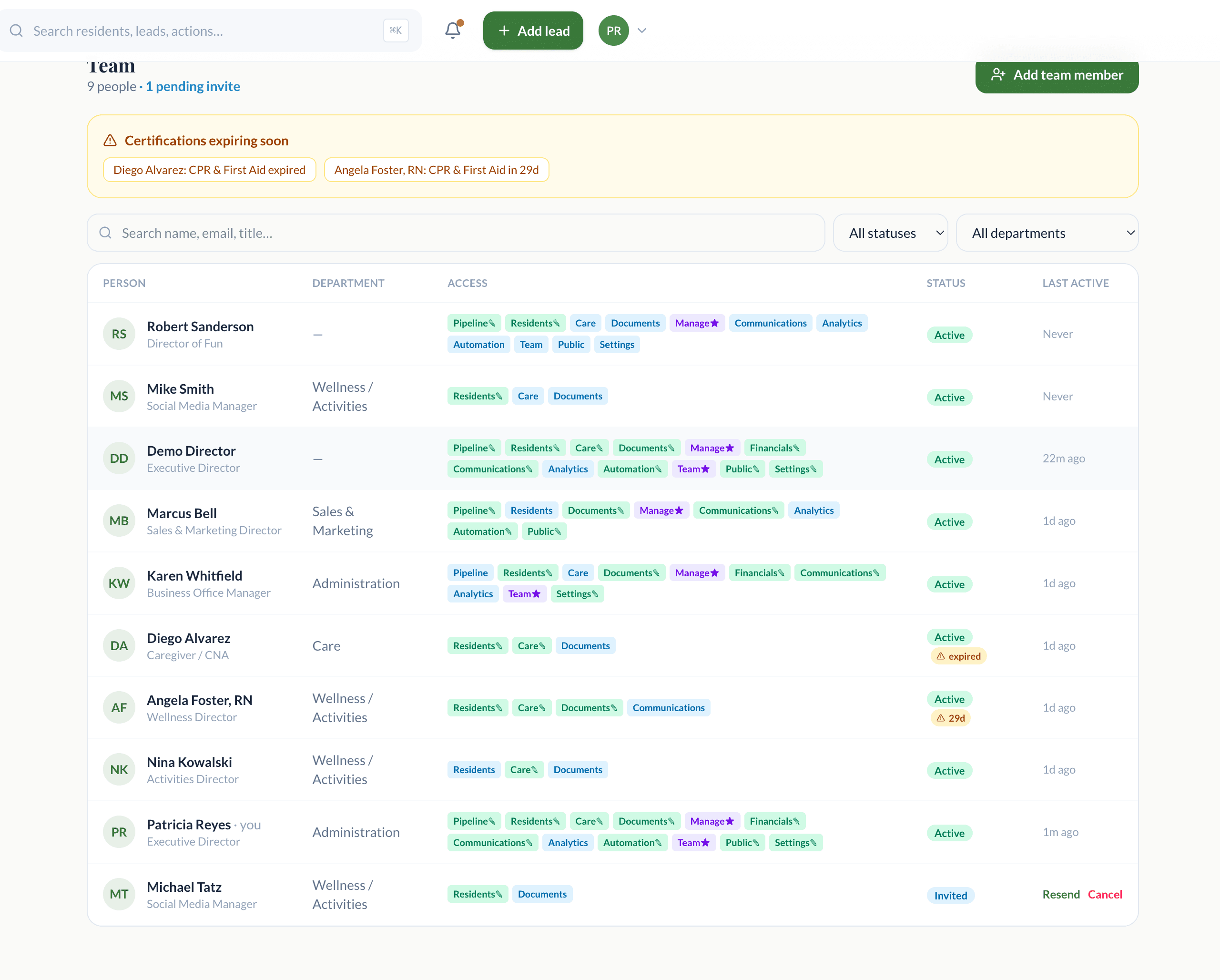
Role-based permissions for Owner, Executive Director, Sales Director, Administrator, and Staff — so a caregiver sees residents and a sales director sees the pipeline, without either stepping on the other. Encrypted storage and per-community scoping throughout.
- Five real senior-living roles, not generic admin/user
- Per-community data scoping
- Encrypted storage
- Multi-source lead capture: manual, CSV, phone log, web form, API
How it actually works
A caregiver on the Staff role can log a daily note and send a family a photo, but never sees the sales pipeline or revenue numbers. Access matches the job, not a single global admin toggle you're afraid to hand out.
Role-based access
- Ownerscoped
- Executive Directorscoped
- Sales Directorscoped
- Administratorscoped
- Staffscoped
Each role sees only what its job needs. Per-community data scoping throughout.
See the real product
The instruments above are faithful recreations. This is the live app itself.
A demo walks you through the real thing with your own community's data loaded in.